
The Midwinter season of gift-giving fast approaches, so here’s a second selection of gifts for you that keep on giving throughout the year thanks to the generosity of groups and individuals around the world who devote their time to creating entirely free, open source software simply because they love doing it. Last time, we recommended LibreOffice, PDF24 and the Linux operating system. This time, we’re looking at the best open source music software. As ever, the programs listed can hold their own against, and even exceed in usability and functionality, paid software that sells for hundreds of dollars.
Personally, I love music and would feel bereft without it. I find it life-enhancing, enriching and inspiring. I listen to music all the time while I’m working, usually on random play so I never know what’s coming next. My hard drive holds more than 80,000 tracks across a wide range of genres from Renaissance Choral through Folk and World to Indie, Pop and Punk. Over the years, as my collection has grown, I’ve tried a lot of different players including VLC, Media Monkey, Winamp, Windows Media Player, the awful iTunes and others. The one that best enables me to access, build, curate and control my collection is MusicBee.
 One thing I love about MusicBee is that it works straight away. No fuss, no complicated set-up and its user-friendly, intuitive interface means there’s no steep learning curve. You just point it at where you store your music and it does the rest for you. Ripping from CDs is easy and efficient via a drop-down menu or you can set MusicBee to automatically rip any music CD you put in your drive. If you prefer to find your sounds through streaming, MusicBee will help you there too. It’ll find album artwork for you, and if it can’t, it’s easy enough to find online, copy and paste into MusicBee. Unless, like me, your tastes run to the wilfully obscure, when you might occasionally have to resort to scanning the art from the CD, but again, copying and pasting it into MusicBee is easy.
By default, MusicBee displays lyrics when they’re available so you can sing along to your favourite tracks without fluffing the words. It has a built-in equalizer, but the pre-installed EQ settings work fine on my set-up, regardless of genre. MusicBee is configurable in a variety of ways but personally I find its original look and layout  attractive and easy to navigate so just leave it as it is. One click toggles you to the neat mini-player mode that displays just cover art, artist name, track title, volume control and basic navigation. MusicBee isn’t a huge drain on resources either so it won’t freeze or crash your system.
All in all, whatever the size of your music collection and whatever genre you’re into, MusicBee is a great, immensely capable and easy-to-use music player. My only gripe is that it’s only available for Windows. There’s no Linux or Apple version. Which brings me to my next pick:
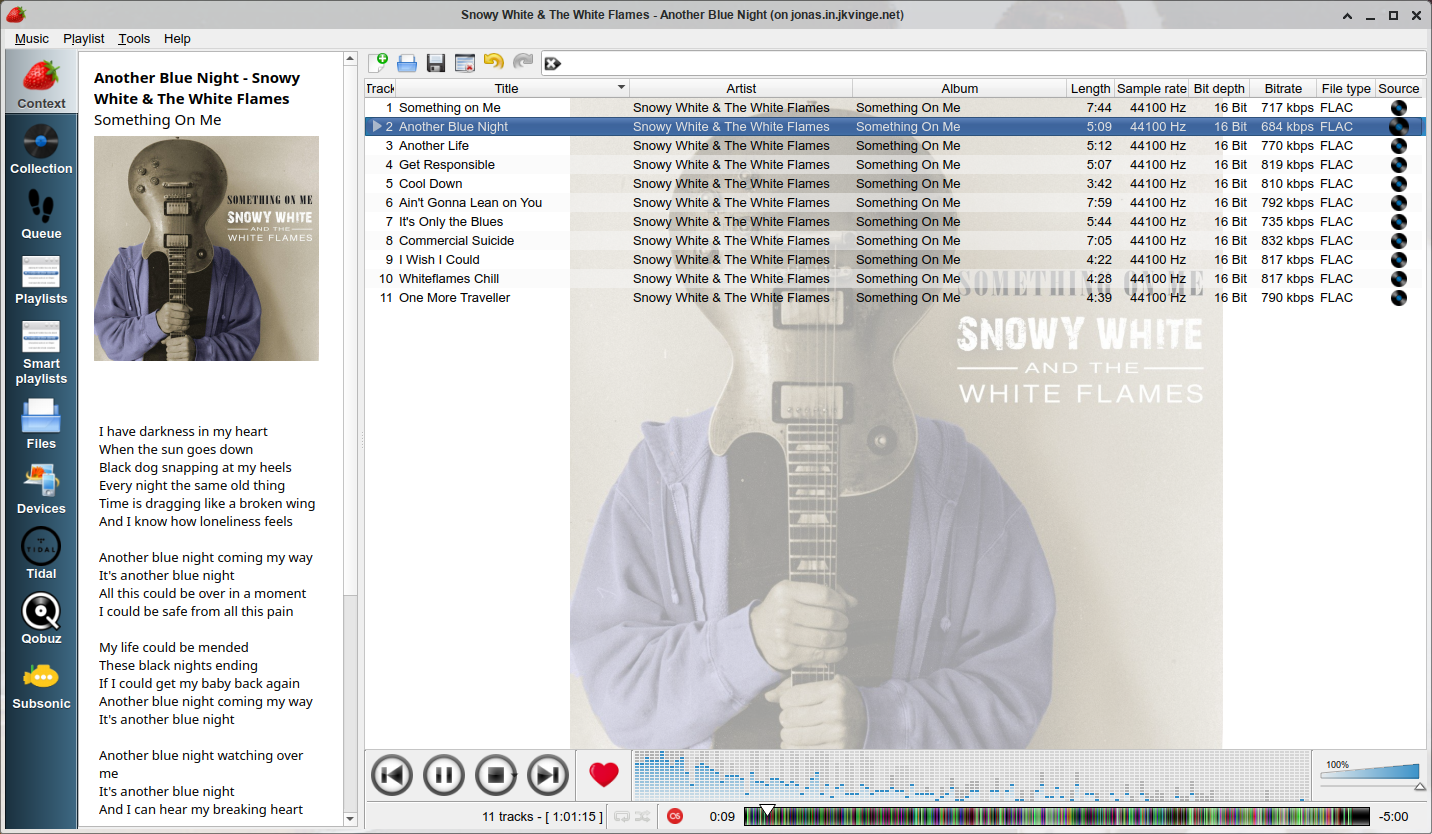
Having used free Linux operating systems since the 1990s, I've have tried quite a few Linux music players. The default is Rhythmbox, which comes ready installed on a lot of Linux OSes. It’s a perfectly good music player for most purposes, albeit not very exciting to look at or use. Then there’s Clementine, Audacious, VLC, Amarok and a whole bunch of others. They all have things to recommend them, but my current favourite is Strawberry I like it for many of the same reasons I like MusicBee. It’s configurable if you feel the need to tweak its settings, but works perfectly fine for me without any modification. It’s similarly easy to use; just point it at your music folder and let it do its thing. Like MusicBee, it’ll rip CDs or stream, retrieve lyrics and artwork and do all the other things you’d expect from a music player. Like MusicBee, it has no trouble handling my extensive library or sounding good across multiple genres without tweaking EQ. And unlike MusicBee, Strawberry is available for Linux, Windows and Mac OSes.
 OK, that’s my top two picks for playing music. How about making music? The genius creators who make fully free, open source software have us well covered there too.
Among the best, and certainly the simplest, open source music creation software is Audacity. In fact, it’s so good, it’s hard to know where to start singing its praises. Maybe the interface, which is just so incredibly easy to understand, navigate and use. Audacity is one of the best software packages ever for user-friendliness. I don’t know about you, but I don’t want to waste time browsing online manuals or helplines just to find out how to perform basic operations. I want something I can load up and use straight away. Audacity is all that and more. You can start recording music within minutes of installing it. You can record as many tracks as you want. You can add a wide range of professional-level tweakable effects to individual tracks or to multiple tracks at once. You can cut and paste to create your own loops. You can reverse drum loops for that great psychedelic effect the Beatles pioneered back in the 60s. You can pitch-shift to blend instruments in different keys.
You can record via a mic or instrument input or through an external mixer. The only problem I’ve encountered with Audacity is that it’s sometimes hard to initially configure it to record from a particular input. But once you’ve got that sorted, everything else is a doddle. And if you don’t play an instrument, you can still create great music using copyright-free clips and loops from free online sources like Pixabay. You can save your tracks in a variety of formats, the most common being mp3 and WAV.
 I’ve used a lot of recording software, from high-end paid professional suites like Steinberg Cubase Pro to other freebies like Waveform or Cakewalk. While they may be able to do things that Audacity can’t, they’re not things I ever need to do and, for me at least, including them just makes the software overly complex, requiring a steep learning curve before you can actually use it. Audacity has a simple, clean interface that just makes all the basics so very easy. This allows you to concentrate on making music rather than learning how to use the software. For years now, Audacity has been the only music creation software I use. Plus it has the added bonus of working on Linux, Windows or Apple OSes, so you can record on whatever’s available and transfer the saved files to another platform with no problem. I love Audacity!
As ever, the wonderful folk who make this software available to us at absolutely no cost and without even any annoying adverts deserve our support. So, if you can, give ‘em a few bucks and help keep the open source revolution rolling.
Thanks, folks!
Greywolf /|\
PS. For the odd doubter who may be wondering what this has to do with Druidry; the foundation of Druidry is the bardic tradition, and music is fundamental to the bardic tradition, both as a source of awen (inspiration) and as a means to express our awen and transmit it to others. That's why there are triads devoted to music and why most of the old verses we now call poems are actually referred to in the text as songs. Taliesin sang.
And in case anyone thinks I'm getting paid to endorse the software recommended in these posts, I'm not. I'm recommending them because they are good and I think more people should know about how good they are and use them in their own creative endeavours as I use them in mine. I'm not even doing it for the free software, because all the software is free anyway :-)